
A retired laptop in a storage room can still hold employee records, customer information, saved passwords, or access to internal systems. The best data destruction methods protect that information before equipment is reused, sold, recycled, or removed from your site. For organizations, the right choice is not simply the most aggressive option. It is the method that matches the media type, the sensitivity of the data, your reuse plan, and the documentation your organization needs.
A practical program starts by separating devices that can be sanitized and reused from media that must be physically destroyed. This distinction helps IT, facilities, and procurement teams control costs without leaving recoverable data behind.
Best Data Destruction Methods for Different Media
There is no single destruction method that works equally well for hard drives, solid-state drives, backup tapes, mobile devices, and removable media. Storage technology matters. A process that is effective for one type of media may be incomplete or inappropriate for another.
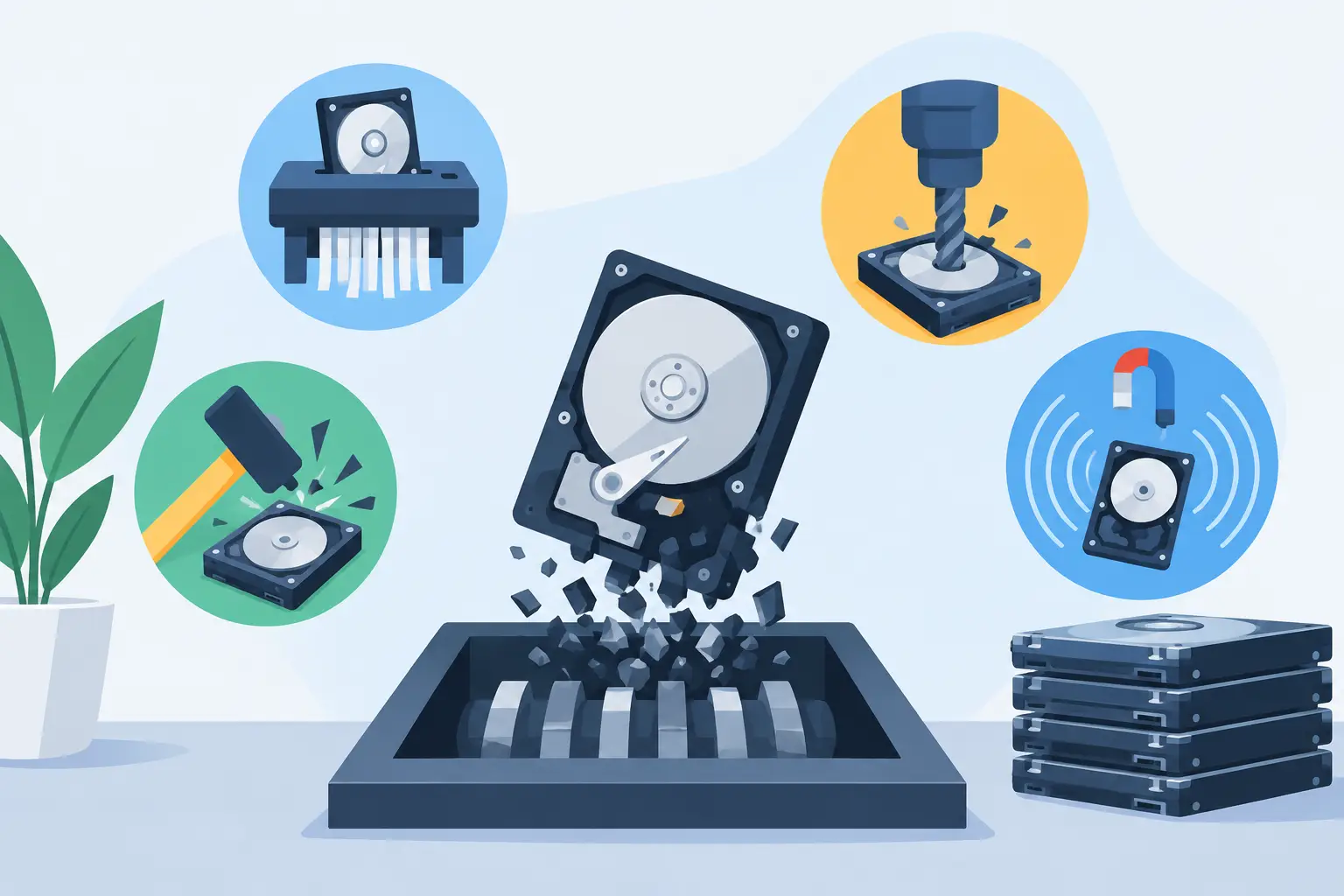
For business assets, the primary options are verified software wiping, cryptographic erasure, degaussing, and physical destruction. Each has a legitimate use case.
Verified software wiping for reusable hard drives
Software-based sanitization overwrites data on a hard disk drive or uses an approved erase command to remove it. When performed correctly and verified, it allows a functional device to remain available for redeployment, donation, resale, or IT asset liquidation.
This is often the best option for standard hard disk drives that still have useful life. It supports the financial value of recoverable equipment and reduces unnecessary material waste. However, a basic file deletion, disk reformat, or operating system reset is not the same as a verified wipe. Deleted files may remain recoverable until the underlying data has been properly sanitized.
A business-grade wiping process should identify the drive by serial number, record the sanitization result, and flag any drive that cannot be successfully erased. Failed drives should move to a physical destruction process rather than being set aside for later review.
Cryptographic erasure for encrypted devices
Cryptographic erasure renders encrypted data unreadable by securely removing or destroying the encryption keys. It can be efficient for self-encrypting drives and properly managed encrypted storage systems.
The limitation is straightforward: cryptographic erasure depends on encryption having been properly enabled and the keys having been managed correctly from the beginning. If an organization cannot verify that condition, it should not rely on key destruction alone. A verified wipe or physical destruction may be more appropriate.
This method can work well in a mature IT environment, but it requires clear asset records and consistent encryption policies. It is not a shortcut for unmanaged devices found in an old office, server room, or remote employee return bin.
Degaussing for magnetic media
Degaussing uses a powerful magnetic field to disrupt data on magnetic storage media. It is commonly used for traditional hard disk drives and certain tape formats. When performed with suitable equipment, it can make the media unusable and prevent data recovery.
Degaussing does not work for solid-state drives, USB flash drives, memory cards, or other flash-based media because they do not store information magnetically. It also eliminates reuse value, since a degaussed drive generally cannot be returned to service.
For organizations retiring older hard drives or backup tapes that contain sensitive information, degaussing may be an appropriate step before recycling. The vendor should be able to document the process and explain which media types their equipment is designed to handle.
Physical shredding for maximum assurance
Physical shredding reduces storage media into small pieces. It is one of the most direct methods for hard drives, solid-state drives, smartphones, tablets, USB drives, optical discs, and other media that will not be reused.
Shredding is often the preferred choice for failed drives, obsolete media, devices with highly sensitive data, and flash storage that is difficult to sanitize through overwriting. SSDs deserve particular attention because data can reside in areas that normal overwrite procedures may not reach due to wear leveling, overprovisioning, and controller behavior. Physical destruction removes that uncertainty when reuse is not required.
The trade-off is finality. A shredded drive has no resale or reuse value. For organizations with a mix of usable and obsolete equipment, the practical answer is usually a combined approach: sanitize and verify viable assets, then shred media that fails testing, cannot be tracked, or requires irreversible destruction.
Why Common Shortcuts Are Not Enough
Businesses sometimes rely on actions that feel permanent but do not provide reliable protection. Emptying a recycle bin, deleting user folders, resetting a phone, or reinstalling an operating system does not demonstrate that data is gone. These actions may remove access through normal use, but they do not necessarily remove recoverable information from the storage media.
Drilling a hole through a drive, breaking a circuit board, or removing a few visible components also creates uncertainty. A drive contains multiple platters or memory chips, and damage to one section may leave other portions intact. These improvised methods also make it difficult to document exactly what was destroyed and when.
For regulated or confidential information, the process needs to be repeatable. That means every asset is accounted for, every exception is handled, and the final disposition is recorded.
Choosing a Method Based on Risk and Asset Value
The right decision begins with an inventory. Record the device type, storage media, serial number, department or location, and intended disposition. A laptop may contain a removable SSD. A network appliance may contain internal flash storage. A copier or multifunction printer may have a hard drive that stores scanned documents, print jobs, and address books. Treat each data-bearing component as part of the asset, not as an afterthought.
Then consider the data classification. Devices that held public marketing materials do not present the same risk as systems that processed payroll, patient information, financial records, student data, legal files, or proprietary engineering documents. Higher-risk media may justify physical destruction even when a wipe is technically possible.
Finally, consider whether the asset has reuse value. A newer, working laptop or server may be a candidate for verified sanitization followed by resale, donation, or redeployment. A failed drive, aging backup tape, damaged phone, or unknown USB device is typically better handled through destruction and recycling.
Documentation Is Part of Data Destruction
Data destruction is not complete when the device leaves the office. Organizations need a defensible record of what happened between pickup and final processing.
A suitable service process should include a clear chain of custody, asset identification where applicable, secure handling during transportation, and a certificate or report confirming destruction or sanitization. The level of detail should fit your internal policy and compliance obligations. For example, an IT manager may need serial-number reporting for individual drives, while a facilities team managing a mixed electronics cleanout may need a pickup record and documented destruction totals.
Ask how equipment is secured after collection, where destruction occurs, whether destruction is performed on-site or off-site, and how exceptions are managed. Also ask how the remaining electronic materials are recycled after data-bearing media has been processed. Responsible destruction should not shift environmental risk elsewhere.
Building a Practical Retirement Process
The most reliable programs do not wait until a storage room is full. Establish a standard path for employee departures, hardware refreshes, office moves, and server retirements. Secure devices in a designated collection area, prevent unauthorized access, and avoid leaving loose drives in open e-waste containers.
Coordinate IT and facilities teams before a pickup. IT can identify data-bearing assets and separate equipment intended for resale from equipment designated for destruction. Facilities can consolidate material, confirm loading access, and schedule collection with minimal disruption. For Bay Area organizations managing large volumes of computers, servers, networking equipment, and peripherals, this coordination reduces both handling time and exposure.
I Got E-Waste supports commercial electronics recycling and secure data destruction for organizations that need a documented, responsible path for retired technology. Qualified loads may also be eligible for pickup service, which helps teams clear obsolete equipment without turning disposal into another internal project.
The best choice is the one your organization can verify. Keep an inventory, match the method to the storage technology, retain the destruction records, and do not let aging devices become an unmanaged data-risk archive.